1. Buatlah tabel polling pada database Anda. Nama database yang saya gunakan "tutorial".
Lalu isi field seperti gambar dibawah ini.
CREATE TABLE `tutorial`.`polling` (
`sangat_baik` INT( 5 ) NOT NULL ,
`baik` INT( 5 ) NOT NULL ,
`cukup` INT( 5 ) NOT NULL ,
`kurang` INT( 5 ) NOT NULL
) ENGINE = MYISAM ;

2. Buka Dreamweaver, Lalu buat halaman polling.php.
copy paste code dibawah ini -->
<form method="post" action="polling-simpan.php">
<table width="426" border="1" align="center" cellpadding="3" cellspacing="0" id="polling">
<tr><td bgcolor="#567632"><h1 align="center">Polling Web</h1></td></tr>
<tr><td><p>Bagaimana pendapat Anda tentang <strong>nagisagothic.blogspot.com</strong> ini ?</p>
<input type="radio" name="polling" value="sangat_baik" />Sangat Baik<br />
<input type="radio" name="polling" value="baik" /> Baik<br/>
<input type="radio" name="polling" value="cukup" /> Cukup<br />
<input type="radio" name="polling" value="kurang" /> Kurang
</td>
</tr>
<tr><td align="center" bgcolor="#567632"><input type="submit" name="button" id="button" value="vote"></td></tr>
</table>
</form>

3. Lalu buat halaman polling-simpan.php untuk melakukan proses menyimpan polling.
copy paste code dibawah ini -->
<?php
$koneksi=mysql_connect('localhost','root','') or die(mysql_error());
mysql_select_db("tutorial");
$polling =$_POST['polling'];
if($polling=="sangat_baik")
{
$querysb = 'select * from polling';
$hasilsb = mysql_query($querysb) or die (mysql_error());
while($row=mysql_fetch_row($hasilsb))
{
$nilaisb = $row[0];
}
$nilaisb = $nilaisb +1;
$insertsb = 'update polling set sangat_baik ='.$nilaisb;
mysql_query($insertsb)or die (mysql_error());
header("location:polling-hasil.php");
}
if($polling=="baik")
{
$querybk = 'select * from polling';
$hasilbk = mysql_query($querybk);
while($row=mysql_fetch_row($hasilbk))
{
$nilaibk = $row[1];
}
$nilaibk = $nilaibk+1;
$insertbk = 'update polling set baik ='.$nilaibk;
mysql_query($insertbk);
header("location:polling-hasil.php");
}
if($polling=="cukup")
{
$queryck = 'select * from polling';
$hasilck = mysql_query($queryck);
while($row=mysql_fetch_row($hasilck))
{
$nilaick = $row[2];
}
$nilaick = $nilaick+1;
$insertck = 'update polling set cukup ='.$nilaick;
mysql_query($insertck);
header("location:polling-hasil.php");
}
if($polling=="kurang")
{
$querykr = 'select * from polling';
$hasilkr = mysql_query($querykr);
while($row=mysql_fetch_row($hasilkr))
{
$nilaikr = $row[3];
}
$nilaikr = $nilaikr+1;
$insertkr = 'update polling set kurang ='.$nilaikr;
mysql_query($insertkr);
header("location:polling-hasil.php");
}
mysql_close($koneksi);
?>
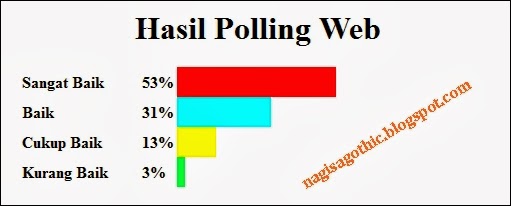
4. Untuk menampilkan hasil polling, buatlah halaman polling-hasil.php
copy paste code dibawah ini -->
<?php
include "koneksiku.php"
?>
<h1 align="center">Hasil Polling Web</h1>
<?php
$query="select * from polling";
$hasil = mysql_query($query);
$row = mysql_fetch_row($hasil);
$total = $row[0]+ $row[1] + $row[2] + $row[3];
$sangat_baik = ($row[0]/$total)*100;
$baik = ($row[1]/$total)*100;
$cukup = ($row[2]/$total)*100;
$kurang = ($row[3]/$total)*100;
if ($sangat_baik == 0) $panjangGrafikSB = 1;
else $panjangGrafikSB = $sangat_baik * 95/ 100;
if ($baik == 0) $panjangGrafikBk = 1;
else $panjangGrafikBk = $baik * 95 / 100;
if ($cukup == 0) $panjangGrafikCk = 1;
else $panjangGrafikCk = $cukup * 95 / 100;
if ($kurang == 0) $panjangGrafikKR = 1;
else $panjangGrafikKR = $kurang * 95 / 100;
?>
<table width="472" align="center" cellpadding="0" cellspacing="0">
<tr>
<td width="111"><strong>Sangat Baik</strong></td>
<td width="30"><strong><?php echo round ("$sangat_baik")."%"; ?></strong></td>
<td width="293"><div style="height:30px; width: <?php echo $panjangGrafikSB; ?>%; background-color:#F00;" ></div></td>
</tr>
<tr>
<td><strong>Baik</strong></td>
<td><strong><?php echo round ("$baik")."%"; ?></strong></td>
<td><div style="height:30px; width: <?php echo $panjangGrafikBk; ?>%; background-color:#0FF;" ></div></td>
</tr>
<tr>
<td><strong>Cukup Baik</strong></td>
<td><strong><?php echo round ("$cukup")."%"; ?></strong></td>
<td><div style="height:30px; width: <?php echo $panjangGrafikCk; ?>%; background-color:#FF0;" ></div></td>
</tr>
<tr>
<td><strong>Kurang Baik</strong></td>
<td><strong><?php echo round ("$kurang")."%"; ?></strong></td>
<td><div style="height:30px; width: <?php echo $panjangGrafikKR; ?>%; background-color:#00FF40;" ></div></td>
</tr>
</table>
#note
round : berfungsi dalam melakukan pembulatan angka.
jalankan pada browser, maka hasilnya seperti gambar dibawah ini.